Nearest Locations for Ninja Forms
Find the nearest location using driving distance, travel time, or radius-based matching directly inside your Ninja Forms.
Why Use Nearest Locations?
Automatically find the closest office, store, service area, pickup point, or destination for every user
Ideal For
- Store locators
- Pickup locations
- Service area assignment
- Closest office selection
- Delivery routing
Benefits
- Automatically match users to the nearest destination
- Support one or multiple results
- Use driving distance or radius searches
- Display results on maps and panels
- Route users into the correct workflow
Find the Closest Location Automatically
Search hundreds of destinations and instantly display the nearest matches

Flexible Location Sources
Search destinations from manual location lists, database tables, or custom datasets.
Driving Distance & Radius Search
Interactive Map Selection
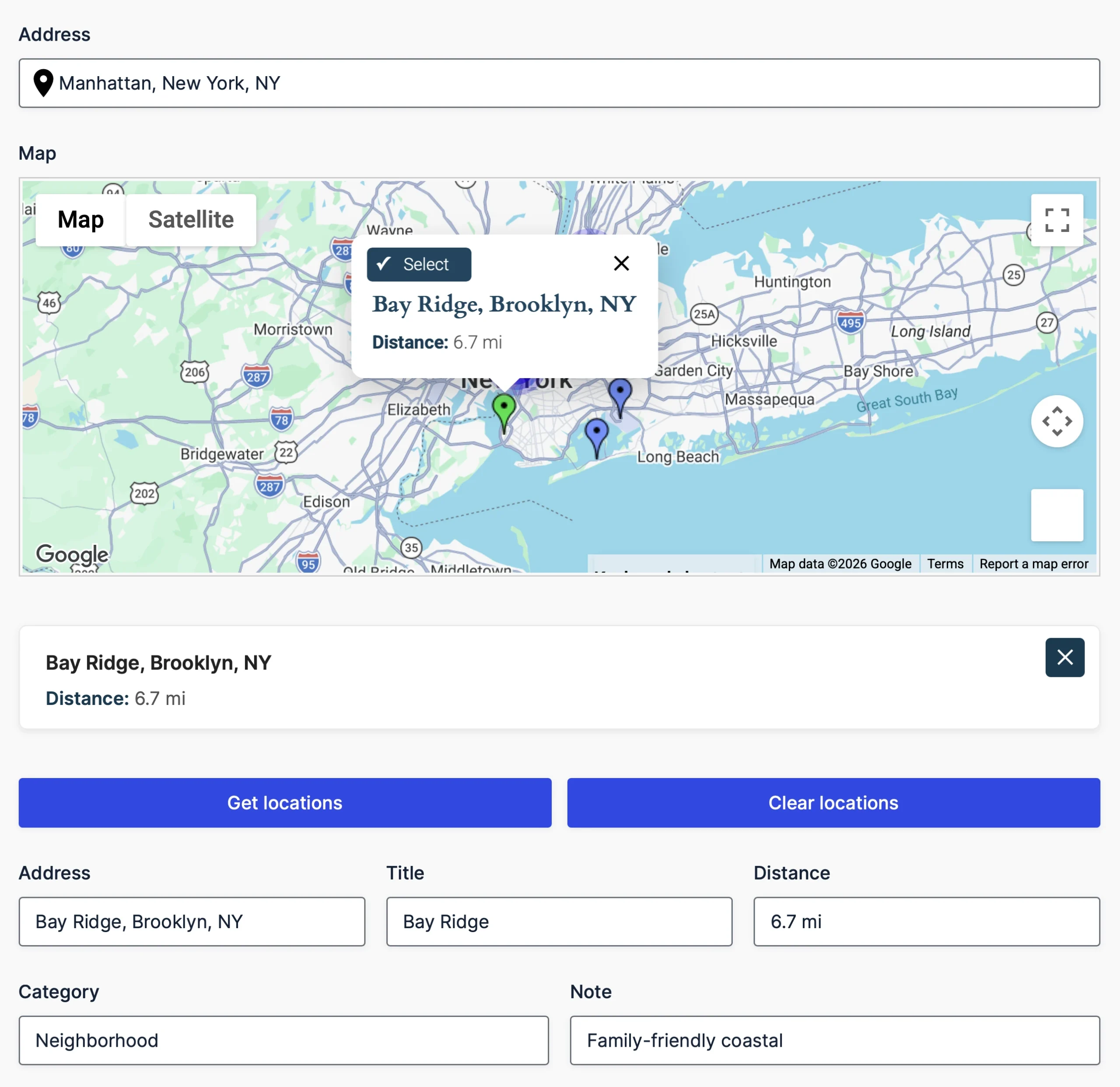
Display nearest matches on a map with clickable markers and info windows.
Automatic Field Population
Send selected locations directly into address fields, hidden inputs, and workflows.
Custom Result Templates
Control exactly how locations appear in maps, panels, and output fields.
Multiple Ways to Find the Nearest Location
Choose how nearest locations are found based on your workflow, data source, and performance requirements
Driving Distance & Travel Time
Find the closest locations using real-world travel distance and duration.
Radius-Based Search
Travel Preferences
Choose driving, walking, bicycling, or two-wheeler travel modes and customize routing behavior.
Unit System Control
Display distances in miles or kilometers to match your audience and region.
Performance Controls
Use the Matrix API for accurate travel calculations or configure thresholds and Matrix API options to optimize performance and reduce API usage.
Dynamic Output & Workflow Integration
Use the selected location throughout your Ninja Forms and automatically populate your workflows
Populate Ninja Forms Fields
Send the selected location into address fields, hidden fields, or Ninja Forms fields.
Interactive Results Panels
Dynamic Field Mapping
Populate additional data such as titles, categories, notes, IDs, coordinates, or any custom dataset fields.
Conditional Logic Ready
Use selected locations and distance values to control form behavior.
Workflow Integration
Pass location data into notifications, emails, calculations, and custom workflows.
Built for Ninja Forms
Nearest Locations integrates directly into Ninja Forms without requiring shortcodes or embedded widgets.
- Add Nearest Locations directly from the Ninja Forms builder
- Configure everything using standard field settings
- Use conditional logic and calculations
- Include values in notifications and confirmations
- Use selected location data throughout your Ninja Forms workflows
- Style them like any other Ninja Forms field
- Works seamlessly with calculations, conditional logic, notifications, submissions, and Ninja Forms add-ons
Built for Real-World Location Workflows
Find nearby destinations and pass the selected result directly into your form workflow
Multiple Location Sources
Use manual location lists, CSV-formatted data, or database tables containing latitude and longitude columns.
Interactive Map Selection
Let users select a location from interactive map markers and view its details in an info window.
Marker Clustering
Organize larger result sets using automatic marker clustering for a cleaner map display.
Flexible Distance Calculations
Filter locations by straight-line radius, with optional Routes API refinement for travel distance and duration.
Dynamic Field Population
Populate configured fields with the selected address, coordinates, identifiers, and other location data.
Native Ninja Forms Integration
Use selected location data in submissions, notifications, calculations, and supported conditional-logic workflows.
Frequently Asked Questions
What is Nearest Locations for Ninja Forms?
Nearest Locations automatically finds the closest store, office, service area, pickup point, or destination based on a user’s address or current location.
How are nearest locations calculated?
Locations are first matched using straight-line distance and an optional search radius. You can then use the Google Routes API to refine qualifying results using real-world travel distance and duration.
What location sources can I search?
You can search manual location lists, CSV-formatted data, or database tables containing latitude and longitude columns.
Can I display results on a map?
Yes. Display matching locations on an interactive Google Map with markers, clustering, and location details.
Can selected locations populate form fields?
Yes. Selected locations can populate configured Ninja Forms fields with addresses, coordinates, identifiers, and other information provided by the location source.
Can I control how nearest locations are calculated?
Yes. Configure the search radius, result limit, measurement units, travel mode, route preferences, and optional Routes API route-matrix refinement.
Do I need a Google Maps API key?
Straight-line and radius matching can work from existing coordinates without a Google API request. The appropriate Google Maps Platform APIs are required when using address lookup, maps, geocoding, or travel-distance and duration refinement.
Which plan includes Nearest Locations?
Nearest Locations and the Nearest Locations Panel are included in the Agency plan.