Ninja Geolocation 3.6 is focused on one goal: making powerful geolocation forms faster and easier to build.
Creating a complete location, distance, directions, or nearby-locations workflow can involve several fields and connections. Version 3.6 keeps the flexibility of Ninja Forms’ individual fields while adding guided Quick Setups, visible field relationships, native form templates, and smarter defaults.
Start with a connected setup, then customize every generated field normally in the Ninja Forms builder.
Build connected workflows with Quick Setups
The new Add quick setup button appears beside Add new field in the form builder. It opens Ninja’s native drawer, where you can choose a workflow, configure its options, review the fields, and add them.
Four Quick Setups are available:
- Location & Map – an Address and connected Geocoder, with an optional current-location button and map.
- Distance & Travel Time – connected origin and destination locations with routed distance and estimated travel time, or straight-line distance.
- Directions & Route – connected origin and destination locations, configurable route details, and an optional route map.
- Nearby Locations – a visitor location, a destination source, nearest-location results, and an optional results map.
Quick Setups create ordinary editable Ninja Forms fields—not a separate managed component. You can move, rename, remove, or configure each field afterward. Publish the form through Ninja Forms to save the generated fields and connections. An Undo action is available after adding an eligible setup, and the drawer’s Done button returns you to the builder.
Feature availability depends on your installed package. Quick Setup choices remain visible; if a setup requires a field that is not included, Ninja’s native upgrade dialog explains the available upgrade.
See how fields are connected
Geolocation fields often work together: an Address supplies a Geocoder, a Map displays locations, and Directions connects an origin, destination, route map, and optional output panel. Ninja Geolocation 3.6 makes these relationships visible directly on field cards.
Connection summaries distinguish connected, optional, missing, and broken relationships. Expand a summary to see connected field labels and IDs, or follow a link to open a connected field. Reverse relationships also show which fields use a Geocoder, Map, or panel.
These indicators provide guidance; they do not prevent you from publishing a form. Connection notices also update immediately when you change the selected field.
Create and connect missing fields from their settings
When a field needs a Geocoder, Map, Directions Panel, or Nearest Locations Panel, you can create and connect the supporting field directly from the relevant setting. If a compatible field already exists, you can select it instead.
The generated field is placed near the field you are configuring when possible, its connection is selected automatically, and an Undo action is available after creation.
Display directions inside the Directions field
A separate Directions Panel is no longer required just to display route information. Show details inside the Directions field, send them to a separate connected panel, or disable the details display.
The distance-and-duration summary and turn-by-turn directions are independent options, so you can display either or both. Route-map settings are grouped separately from the route-detail output settings.
New Directions fields calculate automatically when their connected locations change. Manual button calculation remains available, and existing forms keep their saved trigger settings. New fields also default Avoid Ferries, Avoid Highways, and Avoid Tolls to off; saved preferences remain unchanged.
More flexible Nearby Locations output
Nearest Locations results can appear inside the field or in a separate Nearest Locations Panel. The Quick Setup can use manually entered destinations or a supported database location source, and can add a connected results map.
Existing Directions and Nearby fields with saved panel connections retain their legacy panel output when the new display settings have not yet been saved.
Add estimated pricing with native Ninja Forms calculations
The Distance & Travel Time and Directions & Route Quick Setups can optionally generate a starter estimated-price calculation. Enter a base price, a per-mile or per-kilometer rate, and, for routed travel, an optional per-minute rate.
Ninja Geolocation creates connected Number fields for the required travel values and uses them in Ninja Forms’ native calculation system. The inputs use meters and seconds internally, with explicit conversion for the rates you enter. This keeps pricing inputs separate from formatted distance and duration text.
The generated fields and calculation remain editable. For your own calculations, connect a Number field to a Distance or Directions numeric value and use that Number field in the native calculation picker. Numeric travel merge tags are also available for action and notification content; they are not direct operands in Ninja’s calculation equations.
Fixed locations for stores, offices, and warehouses
Distance and Directions Quick Setups support visitor-entered or fixed locations at either endpoint. Use a fixed address when routes should always begin or end at a store, office, warehouse, clinic, or other known destination.
Starter map positions make a new route form useful before the visitor selects their locations, without automatically calculating a route from those starter positions.
Start from a native Ninja Forms template
Ninja Geolocation 3.6 adds three templates to Ninja’s native new-form template chooser:
- Location & Map
- Distance & Travel Time
- Directions & Route
Choose a template to start with a regular editable form whose geolocation fields and relationships are already configured. Templates are offered when their required fields are included in the installed package. They do not configure your API credentials or notification recipients.
Requirements and upgrading
Ninja Geolocation 3.6 requires Ninja Forms 3.13.2 or newer and PHP 7.4 or newer. We recommend backing up your site and testing updates on staging when your forms contain custom code or complex integrations.
Existing saved trigger settings, panel connections, and older Dynamic travel selections remain supported. You do not need to rebuild those forms to use the new editor tools.
Enable Google Routes API for routed distance, travel time, directions, and route-based nearby calculations. Straight-line distance and proximity searches do not require Routes API. Address autocomplete uses Places API (New); enable the services used by your forms for the appropriate API keys.
Get started with Ninja Geolocation 3.6
Once the update is available through your account, open a form to review its connections, choose Add quick setup to build a workflow, or start from a native Geolocation template.
We would love to hear how the new builder experience works for your forms. If you find an edge case or have an idea for another useful Quick Setup, please let us know.
Ninja Geolocation 3.5 is a major rebuild that expands Ninja Forms from basic location collection into a complete location-aware form toolkit. It adds advanced address validation, route and distance calculations, nearest-location workflows, drawing tools, submission maps, improved repeater support, and a modernized WPGeo Framework runtime.
Before updating, create a complete backup, test the upgrade on a staging site, download the appropriate package from your account, and review the updated Google Maps Platform requirements.
New Location Workflows for Ninja Forms
Validate and Standardize Addresses
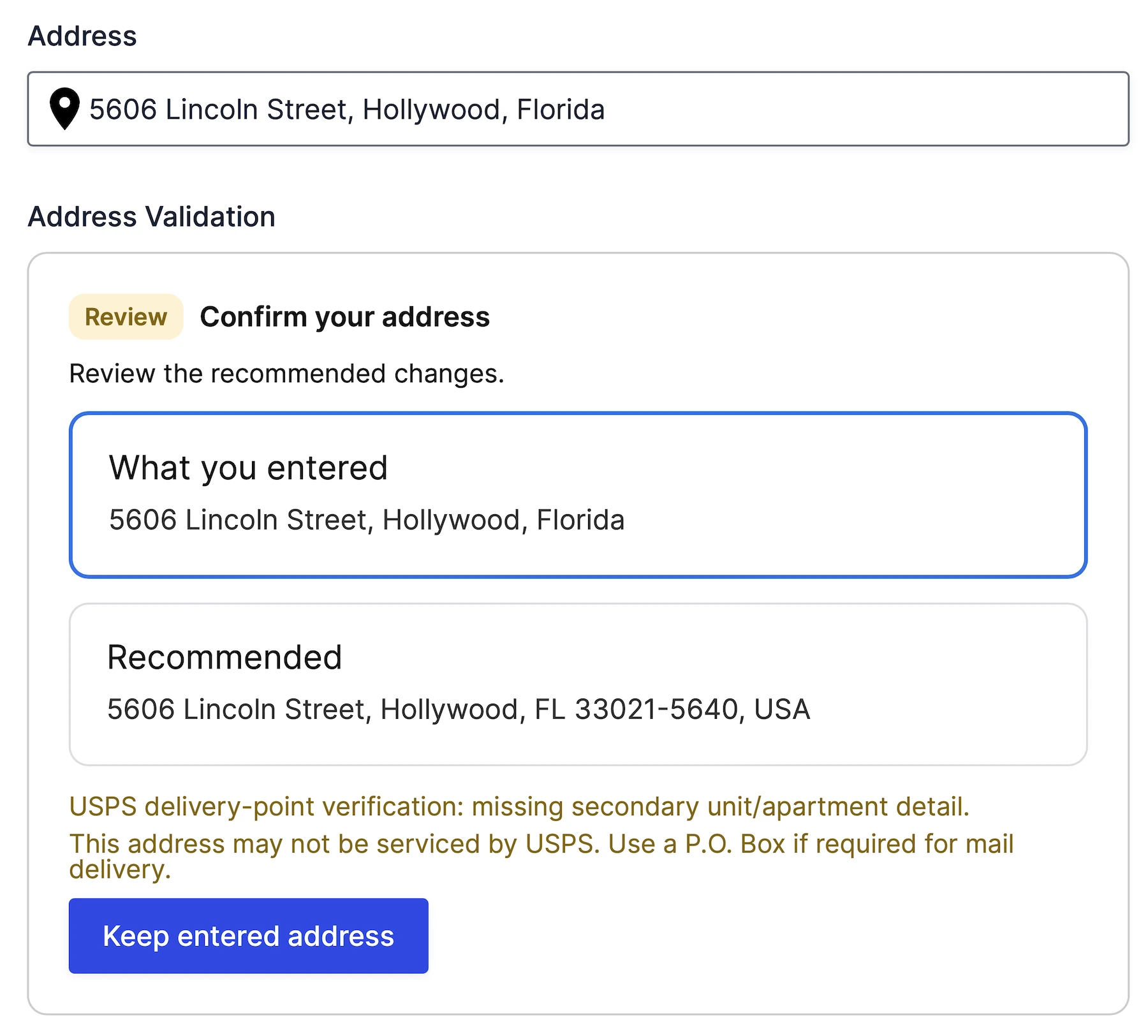
The new Address Validation field checks a Geocoder location, returns validation feedback, and can apply a standardized address suggestion to a connected field group.
Calculate Distance, Duration, and Routes
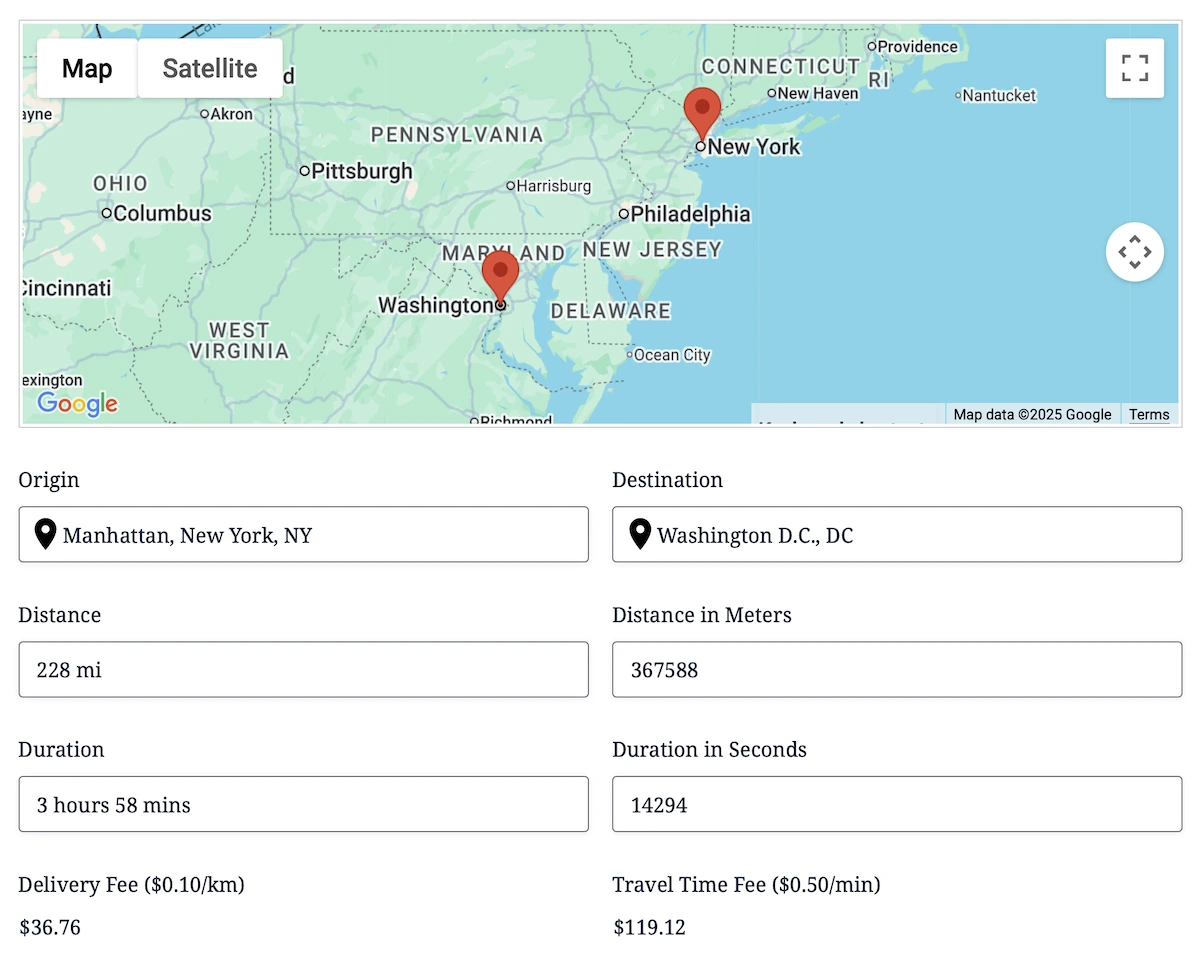
The Distance & Duration field provides route-based or straight-line calculations. The rebuilt Directions field adds optional waypoints, travel preferences, departure or arrival settings, route maps, and turn-by-turn instructions.
Find the Nearest Destination
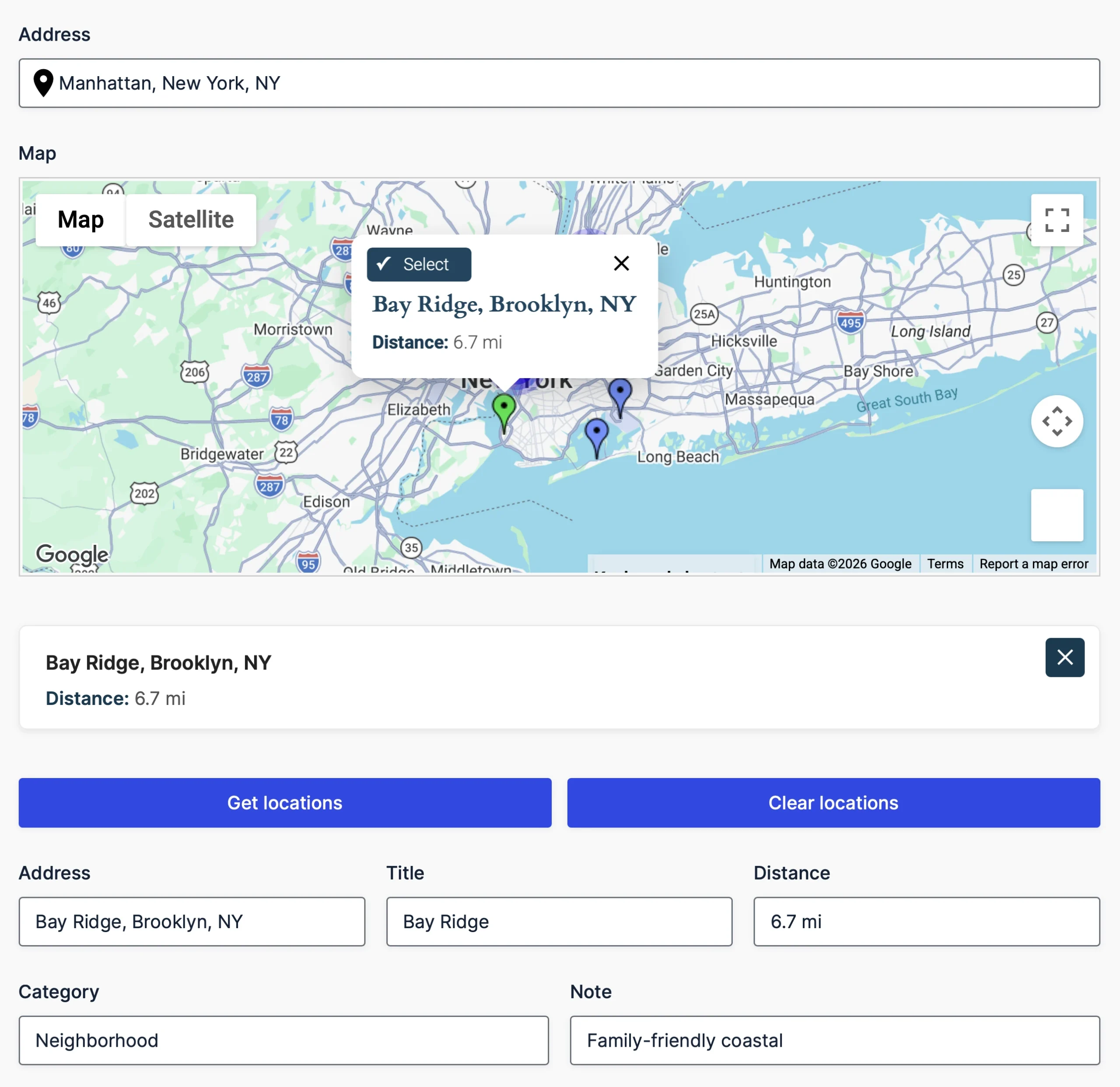
The Agency plan adds Nearest Locations workflows for comparing an origin with manually configured destinations or locations stored in a trusted database source. Results can be filtered by radius, shown on a map, displayed in a results panel, and copied into output Geocoder fields.
Draw Service Areas and Boundaries
Drawing Tools lets users add markers, lines, polygons, rectangles, circles, and freehand shapes to a map. The Drawing Shape field can preload configured shapes and control how visitors may interact with or edit them.

Map Saved Submissions
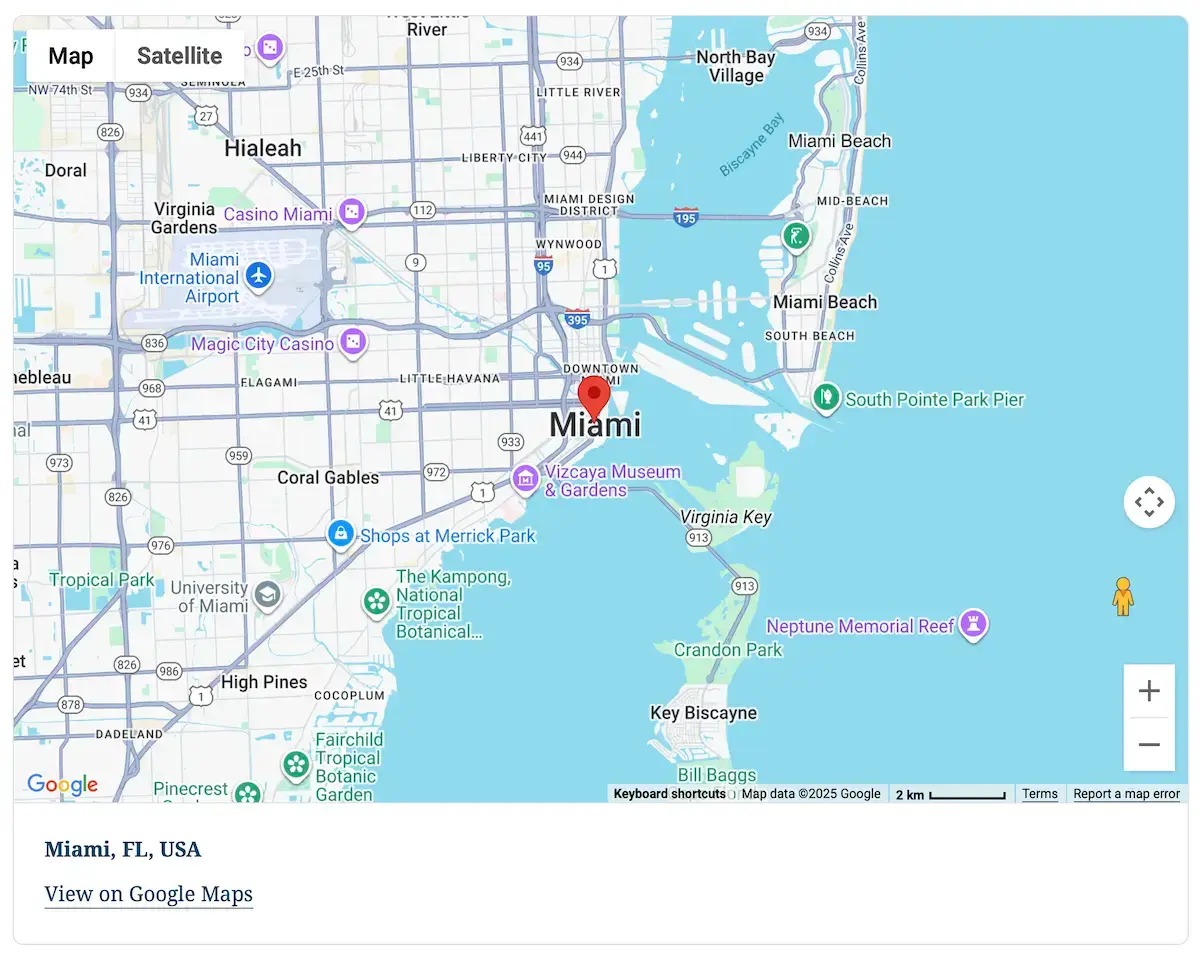
Pro and Agency include shortcodes for displaying an individual saved submission location or combining locations from multiple Ninja Forms submissions on a mashup map.
Starter, Pro, and Agency
- Starter — Core Location Collection: Geocoder, Address, Coordinates, Map, Locator, Reset, and dynamic location tools for one site.
- Pro — Advanced Routing & Mapping: Everything in Starter, plus Address Validation, Distance & Duration, Directions, Directions Panel, and submission maps for three sites.
- Agency — Complete Geolocation Suite: Everything in Pro, plus Nearest Locations and Drawing tools for twenty sites.
Existing Personal and Business customers will receive compatible Ninja Geolocation 3.5 builds that include the Pro feature set. No repurchase is required. Install the package listed in your account, and contact support if the expected download or license details are unclear.
Updated Google Maps Platform Requirements
Ninja Geolocation 3.5 uses separate, restricted Browser and Server API keys. Current autocomplete functionality uses Places API (New), while directions, travel distance, duration, and route-based calculations use Routes API.
Address validation requires Address Validation API, and static map output requires Maps Static API when those features are used.
Existing autocomplete and Directions fields may use limited temporary fallbacks when the current APIs are unavailable or blocked. These fallbacks do not support every Ninja Geolocation 3.5 feature and are not a substitute for enabling the current Google services.
Review the Google Maps API setup guide.
A Versioned Upgrade Path
Ninja Geolocation 3.5 includes an automatic, versioned migration for existing license settings, plugin settings, forms, actions, fields, and repeater fields. Existing Geocoder, Map, and Directions submission data remains readable without rewriting historical values.
Upgraded sites retain their previous marker behavior, while new installations use Advanced Markers by default. The Directions Panel is now a display-only field; saved route output comes from the Directions field.
Before You Update
- Create complete database and file backups.
- Test the update on a staging or development site.
- Enable the Google services required by your forms.
- Install the appropriate package from your account.
- Test existing forms, repeaters, submissions, and map shortcodes before updating your production site.
Read the complete Ninja Geolocation 3.5 upgrade guide.
Explore Ninja Geolocation 3.5
Have questions about upgrading or choosing the appropriate package? Contact support and we’ll be happy to help.
When we introduced Ninja Geolocation 3.5 Beta, we announced a complete rebuild powered by WPGeo Framework, along with new fields including Distance & Duration, Address Validation, Nearest Locations, Drawing Tools, and Drawing Shape.
Ninja Geolocation 3.5.0-beta4 continues that work with two major improvements: WPGeo Framework is now included directly inside the plugin, and a dedicated migration system provides a safer upgrade path from Ninja Geolocation 3.1.1.
Customers no longer need to install or maintain WPGeo Framework as a separate WordPress plugin. The migration system also protects existing settings, forms, field configurations, actions, and saved submission data during the transition to the new 3.5 structure.
Beta 4 additionally includes important security and reliability improvements for the Nearest Locations field and further refinements to the shared foundation that powers Ninja Geolocation.
This remains a beta release. Please back up your site and test the update on a staging or development environment before updating a production website.
WPGeo Framework Is Now Built In
WPGeo Framework provides the shared foundation used by Ninja Geolocation and our other compatible WPGeo-powered plugins.
In earlier Ninja Geolocation 3.5 beta releases, WPGeo Framework was installed and updated as a separate WordPress plugin. Starting with Beta 4, WPGeo Framework 1.0.0-beta27 is included directly with Ninja Geolocation.
For customers, this creates a simpler installation and update process:
- Install and update Ninja Geolocation as one plugin.
- No separate WPGeo Framework download is required.
- No additional framework plugin needs to be maintained.
- Compatible WPGeo-powered plugins can share the same framework foundation.
This change does not remove any of the benefits of the shared framework. It simply places the required framework directly inside the plugin package so WordPress can load a compatible version automatically.
What Happens to the Standalone WPGeo Framework Plugin?
Existing sites that already have the standalone WPGeo Framework plugin are handled through a safe transition process.
On an ordinary single-site WordPress installation, if the separate framework plugin is no longer required, it may be automatically deactivated and marked as safe to delete.
The standalone WPGeo Framework plugin is not automatically deleted. You remain in control of removing it from your site.
WordPress multisite installations are handled more conservatively. A network-active framework plugin will not be blindly deactivated because another site or plugin on the network may still depend on it.
If you use more than one WPGeo-powered plugin, they can share one compatible framework foundation without requiring you to manage multiple framework installations.
Safer Upgrades from Ninja Geolocation 3.1.1
Ninja Geolocation 3.5 introduces a dedicated migration system designed to carry existing plugin configuration into the new version without requiring customers to rebuild their forms.
The migration process has been verified using a complete upgrade from the previously published Ninja Geolocation 3.1.1 release to Ninja Geolocation 3.5.
During the upgrade, the migration system preserves and updates:
- Global plugin settings from the existing installation.
- License information and existing feature access.
- Existing Ninja Forms and form-level geolocation settings.
- Legacy geolocation fields and field options.
- Dynamic Field configurations connected to geolocation data.
- Repeater and nested-field configurations.
- GEO my WP Create Post action settings used by existing workflows.
- Existing Geocoder, Map, Directions, and related submission values.
The migration adds the current settings required by version 3.5 without deleting the legacy configuration and submission data stored by the previous version.
Preserving Existing Submission Data
Previous Ninja Geolocation versions stored some Geocoder, Map, and Directions values in older formats. Rather than unnecessarily rewriting every historical submission, Ninja Geolocation 3.5 includes compatibility handling that allows supported legacy values to remain readable.
This approach reduces unnecessary changes to historical submission data while allowing existing Geocoder, Map, and Directions values to work with the current plugin.
Existing legacy Directions Panel submission values are not deleted during migration. However, the retired standalone Directions Panel value output is not restored in version 3.5, so sites that depend on that specific historical output should review their workflow during staging tests.
Safe to Check More Than Once
The migration is designed to be repeat-safe. Once settings, actions, forms, fields, and submission data have been processed, another migration check does not repeatedly modify the same information.
If part of the migration cannot complete, it is not incorrectly treated as finished. The plugin can notify an administrator that the migration needs attention without unnecessarily preventing the public-facing website from loading.
The upgrade process has been tested with global settings, license data, form settings, geolocation fields, Dynamic Fields, nested repeaters, GEO my WP actions, and existing submission values.
Testing also confirmed that migrated forms remain available in the Ninja Forms builder and continue rendering on the frontend.
Although the migration has been extensively tested, every WordPress site can contain different forms, actions, add-ons, custom code, and stored submission data. A complete backup and staging test remain essential before upgrading production.
Nearest Locations Security and Reliability Improvements
The Nearest Locations field finds and displays the closest matching locations relative to an address, coordinate, current location, or selected map point.
Beta 4 strengthens how public Nearest Locations requests are processed, particularly when locations are loaded from a database.
Public requests no longer provide the database configuration used to locate records. Instead, Ninja Geolocation resolves the trusted Nearest Locations field settings saved by the site administrator before querying available locations.
This keeps public requests within the configuration established in the Ninja Forms builder rather than accepting raw location-source settings from the browser.
Additional improvements include:
- Improved manual-location parsing for supported location-list formats.
- Stronger coordinate validation before locations are processed.
- More consistent zero-distance results when the origin and destination represent the same location.
- Better enforcement of result limits configured by the administrator.
- Refined Google Routes Matrix options for travel-based nearest-location calculations.
- Short-lived server-side caching for identical Matrix requests.
The short-lived cache can prevent unnecessary repeat requests when the same calculation is requested more than once within a brief period. This can improve efficiency while preserving the configured location and routing behavior.
These are proactive security and reliability improvements. They do not indicate a known exploit, customer-data compromise, or emergency security event.
A More Consistent Shared Foundation
Embedding WPGeo Framework helps ensure that Ninja Geolocation is distributed with the framework functionality it requires.
The shared framework allows compatible products to use the same underlying geolocation components while each plugin continues to provide integrations and workflows designed for its supported form builder.
For Ninja Geolocation customers, this means fewer separate components to manage and a more predictable update process as development of version 3.5 continues.
The Distance & Duration, Address Validation, Nearest Locations, Drawing Tools, Drawing Shape, geocoding, mapping, and routing features introduced during the 3.5 beta cycle remain part of the product according to the plan allocations described in the original beta announcement.
Existing plan allocations and site allowances are not changed by this framework and migration update.
Google Maps Platform Reminder
Ninja Geolocation 3.5 uses the current Google Maps Platform services, including:
- Places API (New) for relevant address and place functionality.
- Routes API for routing, Distance & Duration, and relevant Nearest Locations Matrix calculations.
Please confirm that the required services are enabled in your Google Cloud Console before testing the beta.
For complete setup instructions, see our Google Maps API setup documentation.
Google Maps Platform usage may consume API quota and can result in charges from Google depending on your account, configuration, and usage.
What to Check Before Updating
Before installing Ninja Geolocation 3.5 Beta 4:
- Back up your website and database.
- Install the update on a staging or development site first.
- Confirm that existing plugin and license settings remain available.
- Review important forms and their geolocation field settings after migration.
- Test existing submissions containing Geocoder, Map, and Directions values.
- Test new form submissions and saved location values.
- Verify Dynamic Fields, repeaters, nested fields, calculations, conditional logic, actions, and custom integrations that depend on location data.
- Test any workflow that previously used the standalone Directions Panel value output.
- Confirm that Places API (New) and Routes API are enabled where required.
- On multisite, review the network status of the standalone WPGeo Framework plugin before making manual changes.
If your site uses custom PHP or JavaScript integrations, test those customizations carefully before updating production.
Download Ninja Geolocation 3.5 Beta 4
Ninja Geolocation 3.5 Beta 4 provides a simpler one-plugin installation, a dedicated migration path for existing 3.1.1 customers, and stronger security and reliability for Nearest Locations workflows.
Existing customers can download the beta from their account under File Downloads.
Not a Ninja Geolocation customer yet? You can review the available plans on the Ninja Geolocation pricing page.
This is still beta software. Please use staging, create a complete backup, and verify your important workflows before considering an update to a production website.
Your feedback continues to help us prepare Ninja Geolocation 3.5 for its stable release. Please report any bugs, compatibility problems, or unexpected behavior through our support page.
We're excited to announce the beta release of the next major version of Ninja Geolocation.
This release has been completely rebuilt on top of our new WPGeo Framework, bringing significant improvements in performance, reliability, and future scalability while introducing several powerful new geolocation features.
This beta is now available for testing, and we highly recommend installing it on a development or staging site before updating your live website.
Introducing the WPGeo Framework
At the heart of this release is the brand-new WPGeo Framework.
The framework provides a shared foundation across our geolocation products, allowing us to develop new functionality faster while improving consistency, reliability, and long-term maintainability.
- Unified architecture – Shared technology across our geolocation products.
- Faster development – Easier maintenance and quicker feature releases.
- Improved reliability – A cleaner, more robust architecture.
- Future ready – Built to support upcoming features and continued expansion.
Completely Rebuilt from the Ground Up
Ninja Geolocation has undergone a significant internal rebuild.
The new architecture reduces complexity, improves performance, simplifies maintenance, and provides a much stronger foundation for future development.
Alongside these improvements, this beta introduces several major new features designed to expand what you can build with Ninja Forms.
What's New in This Beta
This release introduces several major additions:
- New Distance & Duration field
- New Nearest Locations field
- New Address Validation field
- New Drawing Tools & Shape Fields
- Major architectural improvements powered by the new WPGeo Framework
Together, these additions make Ninja Geolocation more powerful, flexible, and scalable than ever before.
New Features
Distance & Duration Field
The new Distance & Duration field focuses specifically on calculating real-world travel distance and estimated travel time between locations.
While the existing Directions field is designed for complete routing experiences with maps and turn-by-turn directions, the Distance & Duration field provides a lightweight calculation-focused workflow that's perfect for pricing, eligibility rules, delivery fees, scheduling, and other automated processes.
- Purpose-built for calculations – Calculate travel distance and duration without route display.
- Cleaner configuration – Simpler settings focused on calculations.
- Conditional logic ready – Use calculated values throughout Ninja Forms workflows.
- Flexible output formats – Display or store results in multiple formats.
The field supports both Google's Routes API for real-world travel calculations and straight-line (Haversine) distance calculations when appropriate.
View the Distance & Duration demo.
Address Validation Field
The new Address Validation field helps users verify and confirm addresses before a form is submitted.
Instead of accepting potentially incorrect addresses, users can review Google's recommended version and decide whether to keep their original input or use the validated address.
- Interactive address review – Compare entered and recommended addresses.
- Suggested corrections – Improve address accuracy before submission.
- Configurable validation policies – Control how validation behaves.
- USPS delivery verification – Additional delivery insights for supported addresses.
- Workflow-ready outputs – Validation results can be used throughout Ninja Forms workflows.
Address Validation helps improve data quality while reducing delivery issues, failed shipments, and inaccurate location information.
View the Address Validation demo.
Nearest Locations Field
The new Nearest Locations field automatically finds the closest location relative to a user's address or current location.
Whether you're assigning customers to the nearest office, pickup point, service area, or branch, the field calculates the best match using real-world driving distance, travel time, or configurable radius-based searches.
Locations can be sourced in two ways:
- Predefined locations entered directly in the field settings.
- Database-driven locations loaded dynamically from a database table for larger location datasets.
This flexibility allows you to start with a simple list of locations and easily scale to large location databases without changing your workflow.
- Automatic or manual lookup modes
- Driving distance, travel time, or radius matching
- Optional Get/Clear buttons
- Automatically populate form fields with location data
The Nearest Locations field is ideal for assigning the closest branch, technician, pickup location, dealer, office, or service provider.
View the Nearest Locations demo.
Drawing Tools & Shape Fields
The new Drawing Tools & Shape Fields allow users to draw and manage geographic regions directly inside Ninja Forms using Google Maps.
Users can create polygons, circles, rectangles, markers, polylines, and freehand shapes while automatically calculating measurements and storing geometry with every submission.
- Draw multiple shape types including polygons, circles, rectangles, markers, and polylines.
- Live area and distance calculations while shapes are being created.
- Built-in editing tools for resizing, moving, deleting, undoing, and redoing shapes.
- GeoJSON import and export for advanced integrations and reusable map regions.
- Shape styling and labels with configurable colors and appearance.
Drawing Tools make it easy to build delivery zones, service areas, property boundaries, inspection regions, construction sites, event layouts, and many other map-based workflows.
Framework Improvements
Beyond the new features, a significant portion of this release has focused on strengthening the platform itself.
- Cleaner internal architecture powered by the WPGeo Framework.
- Improved runtime consistency across all geolocation components.
- Better long-term extensibility for future features.
- Reduced technical debt and simplified maintenance.
- Faster development cycles through a shared geolocation framework.
These improvements provide a stronger foundation for future releases while making the platform more reliable and easier to maintain.
Updated Google Maps Platform Requirements
This version uses Google's latest APIs and requires the following services to be enabled in your Google Cloud project:
- Places API (New)
- Routes API (replacing the legacy Directions API)
Please make sure both services are enabled before upgrading to the new version. Existing projects using the legacy APIs should review their Google Cloud configuration before updating.
For complete setup instructions, see our Google Maps API setup documentation.
New Licensing Plans
Alongside this release, Ninja Geolocation introduces a new licensing structure designed to better match different project sizes and workflows.
- Starter – Includes the core geolocation fields, including Address, Geocoder, Coordinates, Map, Locator Button, Reset Location.
- Pro – Includes everything in Starter, plus Distance & Duration, Routes & Directions, and Address Validation.
- Agency – Includes everything in Pro, plus Nearest Locations, Drawing Tools & Shape Fields, and future Agency-exclusive functionality.
Existing customers will retain their current site allowances. The new licensing structure affects feature availability only and does not reduce the number of sites supported by any existing license.
See It in Action
Want to explore the new features? Try the live demos:
Important Notes
Because this is a major beta release, please keep the following in mind:
- Always test on a development or staging site before updating production websites.
- Back up your website before installing beta builds.
- If you rely on custom code or third-party integrations, verify compatibility before updating production sites.
- We welcome bug reports and feedback to help us deliver the most stable release possible.
Get the Latest Beta
Existing customers can download the latest beta from their account page under File Downloads.
Not a Ninja Geolocation customer yet? You can view our plans and purchase a license on the Pricing page.
Help Shape the Final Release
This is the biggest update Ninja Geolocation has received to date, and your feedback is an important part of the release process.
Whether you're testing the new WPGeo Framework, experimenting with the new fields, or integrating the plugin into existing projects, we'd love to hear about your experience.
Thank you for helping us improve Ninja Geolocation. We look forward to your feedback as we continue refining the platform and move toward the official stable release.