We're excited to announce the beta release of the next major version of Ninja Geolocation.
This release has been completely rebuilt on top of our new WPGeo Framework, bringing significant improvements in performance, reliability, and future scalability while introducing several powerful new geolocation features.
This beta is now available for testing, and we highly recommend installing it on a development or staging site before updating your live website.
Introducing the WPGeo Framework
At the heart of this release is the brand-new WPGeo Framework.
The framework provides a shared foundation across our geolocation products, allowing us to develop new functionality faster while improving consistency, reliability, and long-term maintainability.
- Unified architecture – Shared technology across our geolocation products.
- Faster development – Easier maintenance and quicker feature releases.
- Improved reliability – A cleaner, more robust architecture.
- Future ready – Built to support upcoming features and continued expansion.
Completely Rebuilt from the Ground Up
Ninja Geolocation has undergone a significant internal rebuild.
The new architecture reduces complexity, improves performance, simplifies maintenance, and provides a much stronger foundation for future development.
Alongside these improvements, this beta introduces several major new features designed to expand what you can build with Ninja Forms.
What's New in This Beta
This release introduces several major additions:
- New Distance & Duration field
- New Nearest Locations field
- New Address Validation field
- New Drawing Tools & Shape Fields
- Major architectural improvements powered by the new WPGeo Framework
Together, these additions make Ninja Geolocation more powerful, flexible, and scalable than ever before.
New Features
Distance & Duration Field
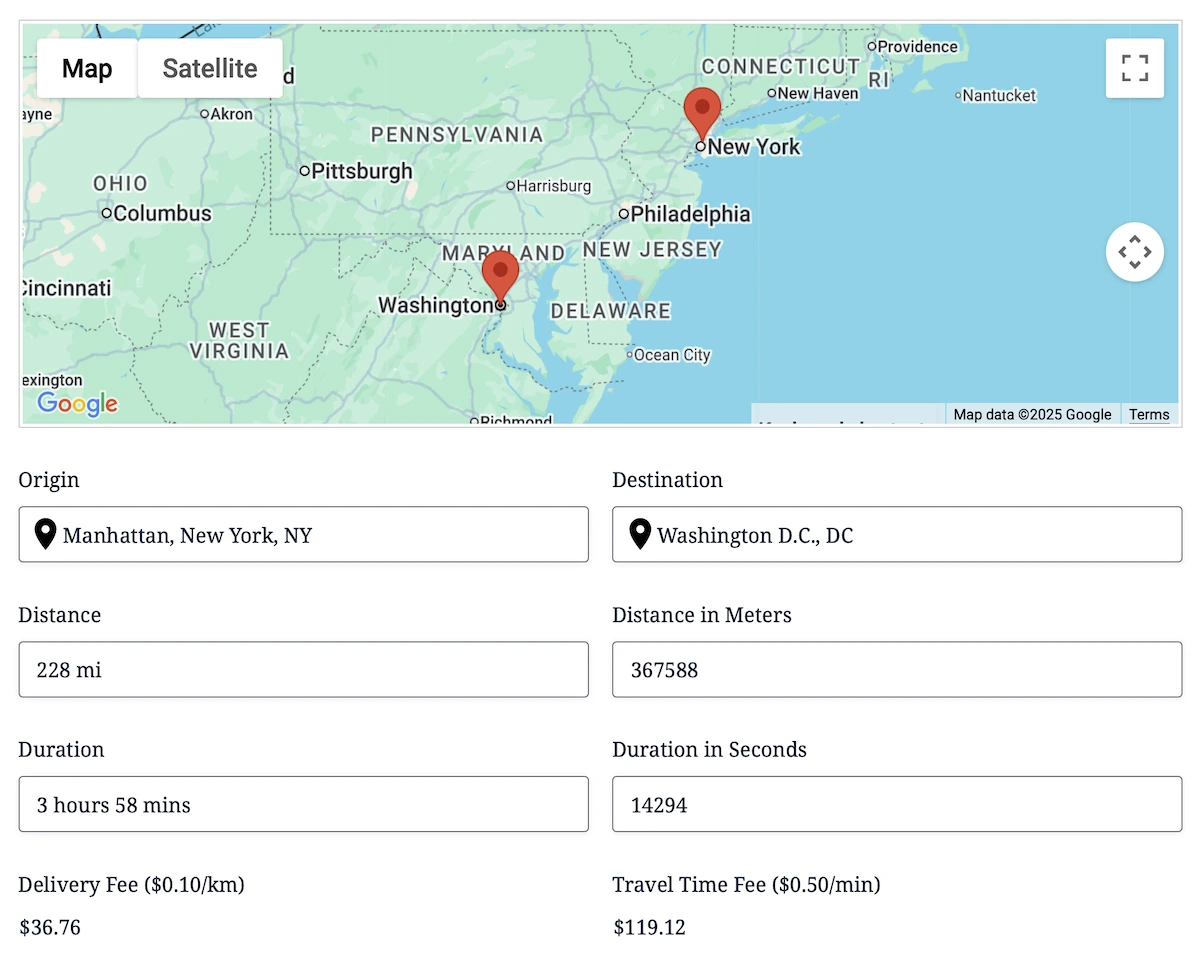
The new Distance & Duration field focuses specifically on calculating real-world travel distance and estimated travel time between locations.
While the existing Directions field is designed for complete routing experiences with maps and turn-by-turn directions, the Distance & Duration field provides a lightweight calculation-focused workflow that's perfect for pricing, eligibility rules, delivery fees, scheduling, and other automated processes.
- Purpose-built for calculations – Calculate travel distance and duration without route display.
- Cleaner configuration – Simpler settings focused on calculations.
- Conditional logic ready – Use calculated values throughout Ninja Forms workflows.
- Flexible output formats – Display or store results in multiple formats.
The field supports both Google's Routes API for real-world travel calculations and straight-line (Haversine) distance calculations when appropriate.
View the Distance & Duration demo.
Address Validation Field
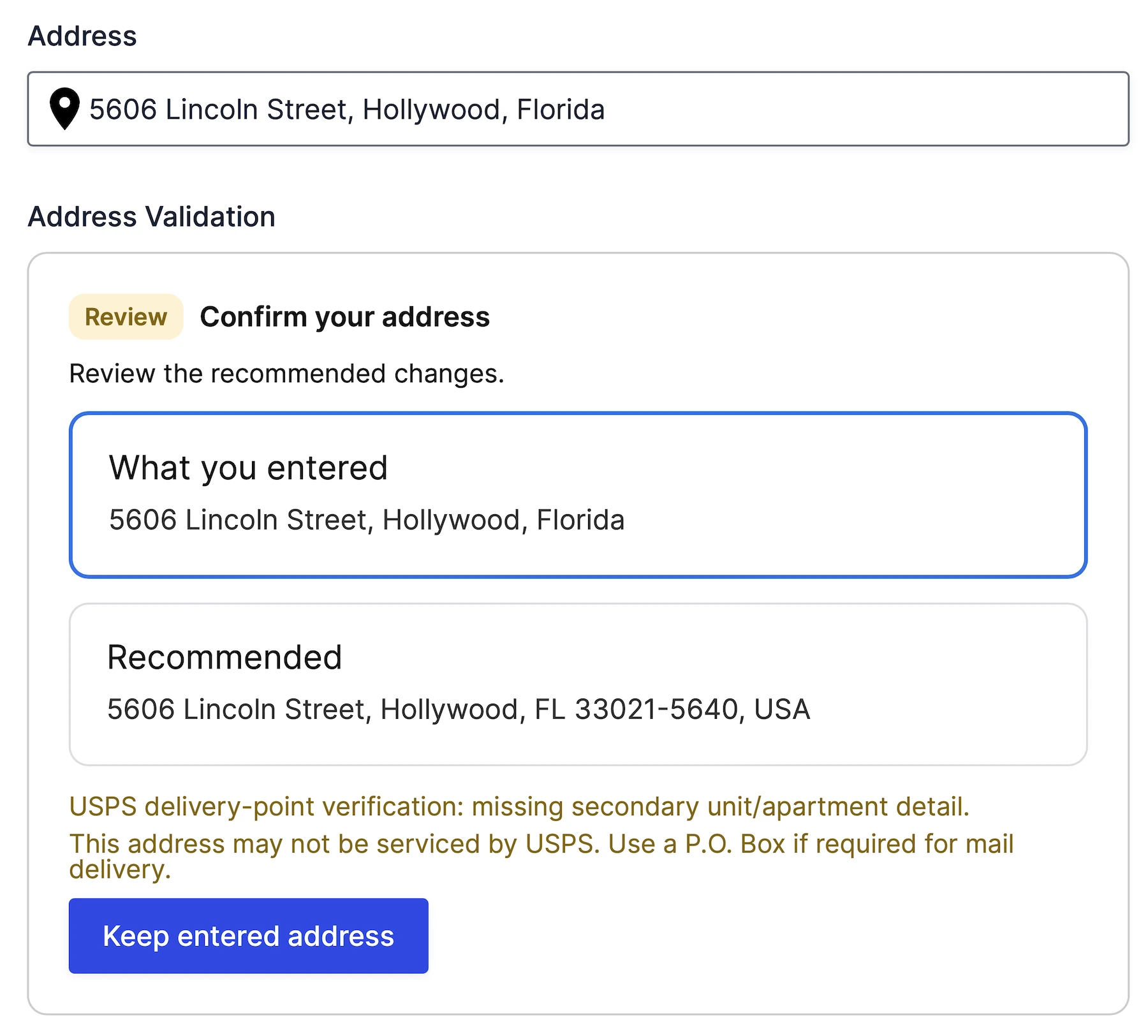
The new Address Validation field helps users verify and confirm addresses before a form is submitted.
Instead of accepting potentially incorrect addresses, users can review Google's recommended version and decide whether to keep their original input or use the validated address.
- Interactive address review – Compare entered and recommended addresses.
- Suggested corrections – Improve address accuracy before submission.
- Configurable validation policies – Control how validation behaves.
- USPS delivery verification – Additional delivery insights for supported addresses.
- Workflow-ready outputs – Validation results can be used throughout Ninja Forms workflows.
Address Validation helps improve data quality while reducing delivery issues, failed shipments, and inaccurate location information.
View the Address Validation demo.
Nearest Locations Field
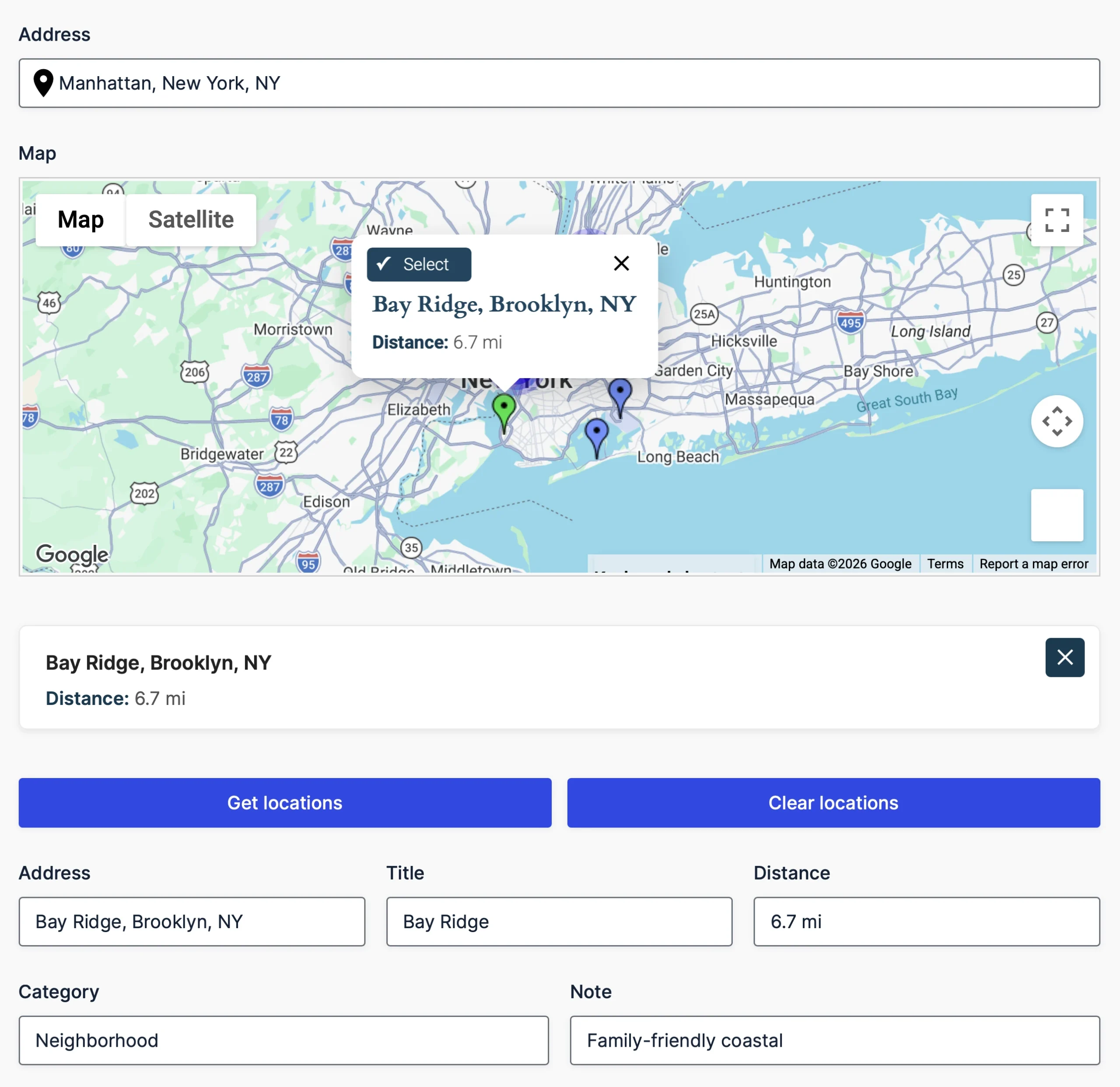
The new Nearest Locations field automatically finds the closest location relative to a user's address or current location.
Whether you're assigning customers to the nearest office, pickup point, service area, or branch, the field calculates the best match using real-world driving distance, travel time, or configurable radius-based searches.
Locations can be sourced in two ways:
- Predefined locations entered directly in the field settings.
- Database-driven locations loaded dynamically from a database table for larger location datasets.
This flexibility allows you to start with a simple list of locations and easily scale to large location databases without changing your workflow.
- Automatic or manual lookup modes
- Driving distance, travel time, or radius matching
- Optional Get/Clear buttons
- Automatically populate form fields with location data
The Nearest Locations field is ideal for assigning the closest branch, technician, pickup location, dealer, office, or service provider.
View the Nearest Locations demo.
Drawing Tools & Shape Fields
The new Drawing Tools & Shape Fields allow users to draw and manage geographic regions directly inside Ninja Forms using Google Maps.
Users can create polygons, circles, rectangles, markers, polylines, and freehand shapes while automatically calculating measurements and storing geometry with every submission.
- Draw multiple shape types including polygons, circles, rectangles, markers, and polylines.
- Live area and distance calculations while shapes are being created.
- Built-in editing tools for resizing, moving, deleting, undoing, and redoing shapes.
- GeoJSON import and export for advanced integrations and reusable map regions.
- Shape styling and labels with configurable colors and appearance.
Drawing Tools make it easy to build delivery zones, service areas, property boundaries, inspection regions, construction sites, event layouts, and many other map-based workflows.

Framework Improvements
Beyond the new features, a significant portion of this release has focused on strengthening the platform itself.
- Cleaner internal architecture powered by the WPGeo Framework.
- Improved runtime consistency across all geolocation components.
- Better long-term extensibility for future features.
- Reduced technical debt and simplified maintenance.
- Faster development cycles through a shared geolocation framework.
These improvements provide a stronger foundation for future releases while making the platform more reliable and easier to maintain.
Updated Google Maps Platform Requirements
This version uses Google's latest APIs and requires the following services to be enabled in your Google Cloud project:
- Places API (New)
- Routes API (replacing the legacy Directions API)
Please make sure both services are enabled before upgrading to the new version. Existing projects using the legacy APIs should review their Google Cloud configuration before updating.
For complete setup instructions, see our Google Maps API setup documentation.
New Licensing Plans
Alongside this release, Ninja Geolocation introduces a new licensing structure designed to better match different project sizes and workflows.
- Starter – Includes the core geolocation fields, including Address, Geocoder, Coordinates, Map, Locator Button, Reset Location.
- Pro – Includes everything in Starter, plus Distance & Duration, Routes & Directions, and Address Validation.
- Agency – Includes everything in Pro, plus Nearest Locations, Drawing Tools & Shape Fields, and future Agency-exclusive functionality.
Existing customers will retain their current site allowances. The new licensing structure affects feature availability only and does not reduce the number of sites supported by any existing license.
See It in Action
Want to explore the new features? Try the live demos:
Important Notes
Because this is a major beta release, please keep the following in mind:
- Always test on a development or staging site before updating production websites.
- Back up your website before installing beta builds.
- If you rely on custom code or third-party integrations, verify compatibility before updating production sites.
- We welcome bug reports and feedback to help us deliver the most stable release possible.
Get the Latest Beta
Existing customers can download the latest beta from their account page under File Downloads.
Not a Ninja Geolocation customer yet? You can view our plans and purchase a license on the Pricing page.
Help Shape the Final Release
This is the biggest update Ninja Geolocation has received to date, and your feedback is an important part of the release process.
Whether you're testing the new WPGeo Framework, experimenting with the new fields, or integrating the plugin into existing projects, we'd love to hear about your experience.
Thank you for helping us improve Ninja Geolocation. We look forward to your feedback as we continue refining the platform and move toward the official stable release.